-->

Remove friends and pages facebook || How to remove friends and pages from shortcuts on Facebook?

How to remove friends and pages from shortcuts on Facebook - Have you put Facebook on your list of shortcuts to your friends or the pages you visit every day? You do not have to leave it intact, because social networks give you the possibility to delete any person or account easily and quickly.

Remove friends and pages facebook || How to remove friends and pages from shortcuts on Facebook?

If you are interested in how to do it, we would like to let you know that you have come to the right place. Here we will explain in a few steps everything you have to do to be able to remove friends from shortcuts on Facebook, do you plan to skip it?  It's that simple to remove a friend from a shortcut on Facebook
 

Also Read: How to delete a story on Facebook
 

The tutorial that we show you below only works for the versions of Facebook that are on Android and iOS. If you are using social media from a computer, you will have to follow the other steps, as these will not help you.

  1. Open the Facebook application from your mobile device.
  2. When you are in a social network, you must press the three horizontal lines (located in the upper right part of the screen).
  3. You will enter the menu of your Facebook account, there you have to press and hold on the page or friend that you want to remove from your shortcut.
  4. A menu will be displayed at the bottom of the screen, click on the option that says "Delete shortcut."
  5. If you did all the steps correctly, Facebook will display the following message “This person has been removed from your shortcut. You will find it in Friends ”.


You can add that friend back to your shortcut, you just need to enter their profile and select the option that says "add to your shortcut".
 

Also Read: How to post on Facebook without people seeing it

How to delete search history on Instagram (quick and easy)

How to delete search history on Instagram - Instagram is one of the most important social networks today. In it, 800 million users post photos or videos for their followers to see.

In addition, the photographic social network stores recent searches and a history of searches made on Instagram, so that if you touch the search button, all searches will appear there.

How to delete search history on Instagram (quick and easy)
 

Also read: How Do You Add Music To An Instagram Story


Sometimes the option to have a search history can be very helpful as it allows for quick access to a profile if it has been searched before. But maybe for some it is a nuisance and there is a very simple way to remove it.


Delete search history on Instagram

The first thing to do is log into Instagram. Once inside, you have to click on the three horizontal lines located on the top right side. Select the "Settings" option located at the bottom.
Then click the "privacy and security" option

Once logged in, click on "Clear search history" located at the end of all the offered options. When the user makes this option, the social network will ask "Are you sure you want to continue?", you have to click yes and Instagram will delete the profile, hashtag and location that the user has just viewed.

Also Read: How to add link or how to swipe up on Instagram
 

For that information that can be shared about how to delete search history on Instagram, hopefully with this information you don't feel confused when you want to delete search history on Instagram because opening Instagram and its history is a privacy for Instagram users.

How to create a folder on TikTok, here's the easy way

How to create folders on TikTok - If you're one of those people who keep so many things in your favorites that it's hard to find them later, it might be a good idea to learn how to create folders on TikTok.

How to create a folder on TikTok

In popular video social networks, folders are called collections. The steps you have to follow to create a new collection are as follows:

  • In the TikTok app, go to the Favorites section
  • Click on the option that says Create new collection
  • In the menu that appears, write the name of the collection you want
  • Click Next
  • Select the video you want to add to the collection
  • Press the red button called Add Video

Also Read: How To Make Sound Effects in TikTok
 

How to create a folder on TikTok, here's the easy way
It is important to note that this feature is relatively new. Therefore, if you don't update TikTok for too long, you may not see the option to create a new collection. While it's normal for updates to be done automatically, otherwise you can manually update apps from their space in the Google Play Store.

How to sort your TikTok videos by category

If you are wondering is how to sort your TikTok videos by category, the first thing you should do is ask yourself if what you want is to order videos from other users that you like and you have decided to save in favorites or if you want . to order your own videos for easy viewing by your followers.

If you want to sort the videos you've seen on a social network, all you have to do is create a different folder or collection to save them. To do this, you need to follow the steps we have described in the previous section. On the other hand, if what you want is to get followers who go to your profile to access different categories and view videos on a regular basis and not just in chronological order, there are other options that can be much more in line with what you want. need.

This is a playlist, a function designed to allow content creators to offer their videos to their followers, or to anyone who visits their profile, in a much more organized way. It's also quite simple to make.

How to make a video playlist on TikTok

Now that you know the two options you have for this, it's time to learn how to create a playlist on TikTok. The steps to follow are:

  • Open the TikTok app and click Me
  • Tap Sort videos into playlist
  • Choose a name for the list
  • Start adding videos

To add a different video to your playlist, you just need to go to the video you want and click the Share button. Apart from the option to share the video on different social networks, you will also find an option called Add to playlist.

Also read: Tiktokfanshack.xyz to get a lot of fans at Tiktok for free
 

Then you will see the names of all the playlists that you have created following the steps we described earlier. You will also have the option to create a new list at that point. From then on, those who go to your profile will be able to see the videos you have created organized by category.

How to remove watermark on tiktok videos, read here

How to remove tiktok watermark on android phone - TikTok, a short video app, has positioned itself as one of the best entertainment platforms in the world. Whenever content is created in a Chinese app, the company's watermark will always appear. For this reason, today we are going to teach you a simple trick to remove watermark on tiktok

How to remove watermark on tiktok videos, read here

If you're on this note, it's because you want to remove the annoying TikTok watermark that appears in different parts of the video if you create it from the same platform. This app doesn't allow you to hide your username and above your logo, however, there are external apps that you can download via the Google Play Store to help you solve this problem.

Also Read: How to trim videos on TikTok without any additional apps

It is important to clarify that this trick only works on phones with Android operating system, not Apple iOS or Huawei HarmonyOS. So please understand all the steps below so you can share your tiktok videos without a watermark.

How to remove watermark from TikTok

  • First, when you are done recording a TikTok video, you have to download it so that it can be saved in your gallery.
  • Then, go to Google Play Store and install the "Remove & Add Watermark" app.
  • Open it and it will ask you to give it permission so it can work normally.
  • Now, click where it says 'Select video'.
  • Then, tap on 'Remove logo', several folders will open, select 'Gallery'.
  • When you select a video, it will open along with a shaded box, the number matches the TikTok logo or watermark so the app deletes it.
  • The next step is to click the 'Save' option located in the upper right corner and wait for 'Delete' to finish processing the video.
  • Finally, I choose a platform for sharing videos, it can be WhatsApp, Facebook Messenger, Instagram, etc.


Also Read: How To add tiktok free followers From Tiktoktake.com
 

If you follow these steps, you have removed the annoying watermark from the famous Chinese short video app to be able to share your videos without any additional unwanted information.

How to put music in instagram feed, read here

How to insert songs into feed posts on instagram - Instagram test feature that allows you to include music in posts published on feeds. This is a reality in Stories and Scrolls format, but it never lands in the most traditional publications on social networks. In this initial phase, only three countries will be covered: Brazil, India and Turkey, the company's three largest markets.
How to put music in instagram feed, read here

Users will be able to browse music clips in the app's trending section or search for specific songs. When using the gimmick, the song title will appear in the header of the feed post and, when clicked, will guide the person to a special page containing all the posts that have recently used the song.
 

Also read: How to set up Instagram app notifications

The mechanics of entering the desired sound should be similar to what already exists in other formats: the person chooses the duration of the clip and how long the audio will play. Then, the person has to choose which part of the song to add and then just publish it. It's worth noting that novelty will not work for publications in carousel format, only for single photo posts.

More than just music, voices in feeds can open up new future possibilities for content creators to creatively explore one of the platform's most important areas — and abandoned by developers. It is possible to match images, subtitles and soundtracks to create a more immersive experience in posts.

How to insert a song into an instagram feed post

Follow the tutorial below to start publishing with your favorite songs:

  • Select a photo and, in the last step, click "Add Music";
  • Search for singers, bands or songs in the "Search" field or search for popular songs in the "Trends" or "For You" sections;
  • Select the song you want to add to your photo;
  • You will be able to choose quotes and songs of up to 90 seconds to include in the Feed post;
  • Click "Done" and then "Share."


Also read: How to Download Instagram photos and videos on Android

Since this is something in the testing phase, it's possible that not everyone will accept the new stuff at this point or it will take a few days to get it working. However, it's possible that there will be some difficulties at the beginning, at least until the developers fix all the flaws. If you are not one of the winners, the only thing left to do is update the app and hope to receive it or wait patiently for a wide release for everyone.

How to permanently delete a TikTok account is very easy

How to delete a TikTok account - TikTok is a social network that has become very popular in recent times, especially in the last few weeks, when due to the confinement that exists in many countries due to the coronavirus health crisis, it has become a route of escape and entertainment for many users.

However, despite the fact that it is a platform that has accumulated success for a long time, there may be times when you get bored or just after trying it, it is not a social network. that matches what you are really looking for. Whatever the reason, this time we will show you how to delete your TikTok account forever.

How to permanently delete a TikTok account is very easy

Whenever a new social network or platform is launched, usually many people feel the urge to sign up to try it out, where the whole registration process is done without knowing whether it will actually be used or not. On many occasions, users sign up and upon seeing that it is not to their liking, they limit themselves to leaving it, leaving their account open. This is an error if it is clear that it will not be used, because in some way data is provided that can even be exposed to others.


Also Read: How to trim videos on TikTok without any additional apps

 
For this reason, when the time comes when it becomes clear that you do not want to be part of a social network, the best thing to do is to close and delete the account completely, so that your personal data and access can be safe. . .

In any case, the next time you decide to leave a social platform, regardless of the reasons why you decide to do so, it's important that you know how to leave it permanently and that requires account deletion.

Also, it should be taken into account that this social network always has "open" content, i.e. you don't have to be a user of the platform to be able to view all the videos that its users decide to upload publicly. .To the platforms. Therefore, if you are not going to upload your content or you do not need it to be able to access other users' private content, you can delete your account without this meaning you can stop watching TikTok videos.


How to delete TikTok account

Taking all of the above into account, we will explain the steps you should follow if you want to know how to delete your TikTok account forever:

First of all, you will need to access the app via your mobile device and, once you have done that, you will need to go to your user profile, where you will find the icon represented by three dots.

You have to click on it and it will take you to the Privacy and Settings options. When you are in it, you just have to click on the section that shows Manage Accounts.

From this window you will find that, at the bottom, the Delete account option appears. There you have to click on it to start the elimination process.

Once you provide it, TikTok will ask for verification to confirm that it is you, the account owner, who really wants to remove it from the platform. In this case, a code will be sent to you via SMS which you must enter, unless you are already logged in with Facebook, in which case it may ask you to sign in with it to delete it.

Once you have entered the code or performed the steps shown on the screen for deletion, you just need to Confirm and you will complete the process.

Once an account is deleted, it is not deleted immediately, as the process takes effect after 30 days have passed from publication. Until then, if you regret it, you can log in to recover your account. This is a common option on social networks, so it offers the possibility that users don't get carried away by impulse and delete their account and regret it soon after.

Also Read: How to get 50,000 followers unlimited form tiktokfiesta.com

 
If you regret it, but you do so after those 30 days, you will find that you will no longer be able to log in with that account, which will cause you to lose access to any videos you may have published. on the platform, Likewise, you will not be able to receive refunds for purchases made or recover other information associated with your account.


How to add siri voice on tiktok [ Siri Voice on TikTok ]

Siri Voice TikTok - To make their operating systems more accessible, iOS and Android have introduced many functions. Among these features is the 'speech test' option that reads your text aloud.
This text-to-speech feature is often called the Siri effect. For all those who do not use an iPhone, Siri is the voice that reads the texts for you. It is certainly an updated Artificial Intelligence feature.

This text-to-speech option has been very effective. It has helped people with disabilities to use their devic

How to add siri voice on tiktok [ Siri Voice on TikTok ]

es with relative ease. It has also given people the opportunity to drive safely because text-to-speech discourages distraction.


The text-to-speech feature is trending on TikTok. Why would it be like this? Well, the reason this is trending on TikTok has to do with Siri's voice. People tend to find his voice quite refreshing and funny.
 

Also Read: How to trim videos on TikTok 


Siri Voice on TikTok has been trending for a couple of months now and people have used this effect in many videos. I am this article that I am going to tell you about this and more.

What is the TikTok Text-to-Speech feature?

The TikTok Text-to-speech audio effect is a new introduction to the existing TikTok features. One of the reasons for so many features on TikTok is that you want to stay in the game. With so many amazing features, TikTokers continue to be happy and contribute more to the app.

This formula has worked quite well. TikTok enjoys an advantage over many social media sites today. That's not all, aim to go even higher. And with features like text-to-speech, you're sure to hit the mark.
To find out what text-to-speech is all about, think about Siri. Siri and the other automated voice read the text aloud. But on TikTok, in addition to reading texts, this function also reads emojis. The reason for its popularity is related to the fact that the interpretations of certain words are hilarious.

How to make Siri voice on TikTok / How to add siri voice on tiktok

So far so good. Siri's voice on TikTok is currently a sensation. Hopefully this effect is here to stay, at least until this holiday season is over.

Many of you must be wondering how to make text to speech videos on TikTok. Or put another way, how to use text to speech on TikTok?

Well the answer is quite simple. To use it in your videos, you will need to follow the instructions below.
 

Also Read: Tiktokforme com how to get free Tiktok Followers with Tiktokforme.com
 

First of all, download the TikTok app that you don't have yet. Once installed, open the application and make the video you want. Once you're done, the text-to-speech effect has a role to play in the editing section.  When you edit your video, you have the option to add some text. Touch it and write what you want.

How to use text to speech on TikTok?

Some people also approached me and asked how they can add subtitles to their videos. You will need to add subtitles so that the Siri effect pronouns of the words are not taken as they are.

In other words, it is a way of ensuring that people understand what is being said. To add a title, you need to follow the steps below.

First, to add text to the video, you need to go to the editing section. The video can be played while adding texts. Second, once you are done, tap on the text and select "set duration". Here you can insert the text wherever you want in your video. Isn't that useful?

Also Read : How To Get Free Tiktok followers from tiktokpride.com


How to sign out of Twitter on all your devices [easy]

How to log out of Twitter on all your devices -  Although Twitter has defenders and detractors in equal measure, there is no denying that it has become a loudspeaker for politicians, celebrities and professionals in all fields. And, sadly, also for trolls and hoax spreaders. But the latter are quickly detected.

How to sign out of Twitter on all your devices [easy]
The fact is that if you are a Twitter user, either as a mere reader or also as a message or tweet publisher, you can log in to Twitter on different platforms, Web, iPhone, iPad and Android. However, you have to watch where you log in, in case someone accesses your username and publishes on your behalf or accesses your contact list.


Here are the simple steps to log out of Twitter on supported platforms. In addition, we will see how to know from where you have accessed Twitter and close all sessions except where you are at that moment.


Also Read: How To Share Tweets from Twitter To Instagram Stories


How To Sign Out of Twitter on all your devices
 

1. Close your Twitter session on the Web

The simplest way to access Twitter is from its online version, compatible with both PC and Mac as well as tablets and smartphones.

Logging out of Twitter for the Web is as easy as clicking on your profile name in the lower left corner and then clicking Log Out.

The same happens with the alternative and official Twitter application, TweetDeck, also available in a web version. To log out, click on the icon above your profile photo, in the lower left corner. Then you will have to click on Log out.

2. Sign out  of Twitter of iPhone, iPad and Android

If you want to close your Twitter session in the official applications for iPhone, iPad and Android, you must enter your user profile and go to Settings and privacy. Then click on Account and, finally, on Close session.

In the case of using two or more Twitter accounts in the same application, to log out of each of them you must go to Configuration or Settings of the operating system and within Twitter select those that no longer interest us and then click on Delete account .

3. Sessions opened with your account

To check all the sessions that you have open from your Twitter account, you can do it from one place instead of looking at devices manually.

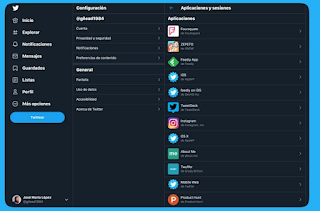
From Twitter for Web, once you have logged in, you should go to More options> Account> Applications and sessions. Another possibility is to access directly from this link.

How to sign out of Twitter on all your devices [easy]

In Applications you will see the list of games, pages and apps to which you have given permission to use your Twitter account. If you no longer use them, you can enter them and click on Revoke access. If they need to use Twitter, they will let you know.

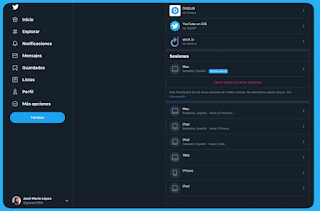
From Sessions you will see precisely that, the sessions open on Twitter. It will indicate the platform, when it was accessed for the last time and the approximate city and / or country. By entering each one you will be able to log out remotely.

How to sign out of Twitter on all your devices [easy]

Finally, if you want to log out of all your devices at the same time, except where you are at the moment, you just have to click on Close all other sessions.

Also Read: How To Reset  Password Twitter Account

Back To Top